A yahrtzeit report answers the question every office asks at the start of a month: whose yahrtzeit is coming up, and who has to be told? It produces the list, the letters, the labels and the emails from one place.
It is its own kind of report, separate from contact and transaction reports, because it works in both calendars at once — the Hebrew date decides when the yahrtzeit falls, and the civil date decides when you have to post the letter.
The builder works like the others — Reports covers the basics. What follows is what is particular to this one.
Where It Is
Reports → Yahrtzeit in the sidebar. Saved reports are listed as they are everywhere else, with folders, sharing and the same row actions.
What the report finds depends on what is on the records themselves: the date of passing, and the relatives marked Notify. Add Yahrtzeits covers entering those.
Which Yahrtzeits Are Included
The first and most important section is Yahrtzeit Date.
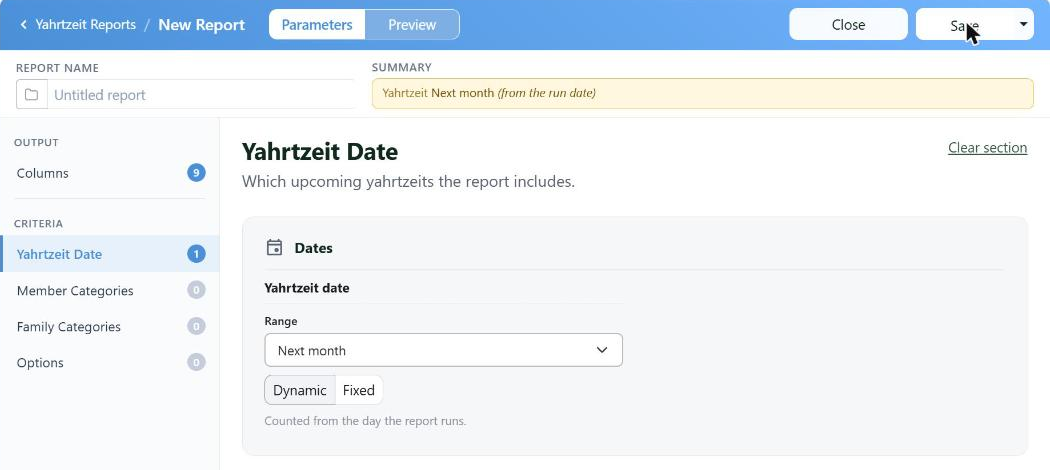
Dynamic ranges are counted from the day the report runs, which is what makes a saved report worth saving.
Choose a range — next month, the coming week, and so on — and then how it is anchored:
| Setting | What it means |
|---|
| Dynamic | Counted from the day the report runs. Next month means next month, whenever you run it |
| Fixed | The exact dates you type, every time |
Build it once as Dynamic and save it. On the first of every month you open the saved report and it is already right — no dates to change, nothing to forget.
The summary line at the top always spells out what the report will do, so you can see Yahrtzeit Next month (from the run date) before you run anything.
Narrowing Who Is Included
Options is where a yahrtzeit report earns its keep, because the same list is used for very different jobs.
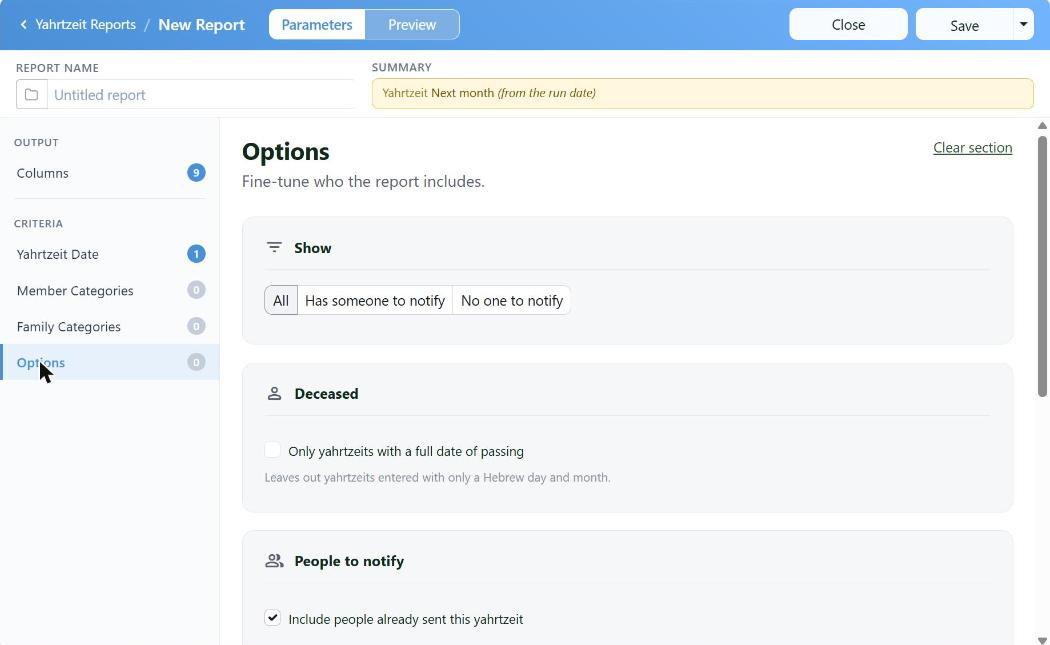
The Show filter decides whether you are producing a mailing or finding the gaps in your records.
| Option | What it does |
|---|
| Show: All | Every yahrtzeit in the range |
| Show: Has someone to notify | Only the ones with a relative to write to — what you want for a mailing |
| Show: No one to notify | The opposite, and the most useful housekeeping report you can run: yahrtzeits recorded with nobody attached to them |
| Only yahrtzeits with a full date of passing | Leaves out the ones entered with just a Hebrew day and month |
| Include people already sent this yahrtzeit | Uncheck it and anyone already written to this year drops off — so a second run catches only who was missed |
| Mailing address | Limit to people with a complete address, and exclude the ones marked No Mail. For a printed run |
| Email | Limit to people with an email address, and exclude the ones marked No Send. For an email run |
Member Categories and Family Categories narrow it further, if you only want one part of your list.
Columns
The fields come in three groups, because a row is really a yahrtzeit and a person being told about it:
- Yahrtzeit — the date of passing in both calendars, the next occurrence, its weekday, and the eve.
- Deceased — their name, Hebrew name, and father's and mother's names.
- Person Notified — who is being told, what they were to the deceased, and how to reach them.
Sorting by Next Occurrence is usually right: the list then reads in the order the yahrtzeits will actually happen.
The eve columns are worth taking for a mailing. A yahrtzeit begins the night before, and a letter that names only the day sends people to shul twenty-four hours late.
Letters, Labels and Emails
Preview shows what you are about to send — with a plain summary above it, such as 6 yahrtzeits, 2 people to notify.
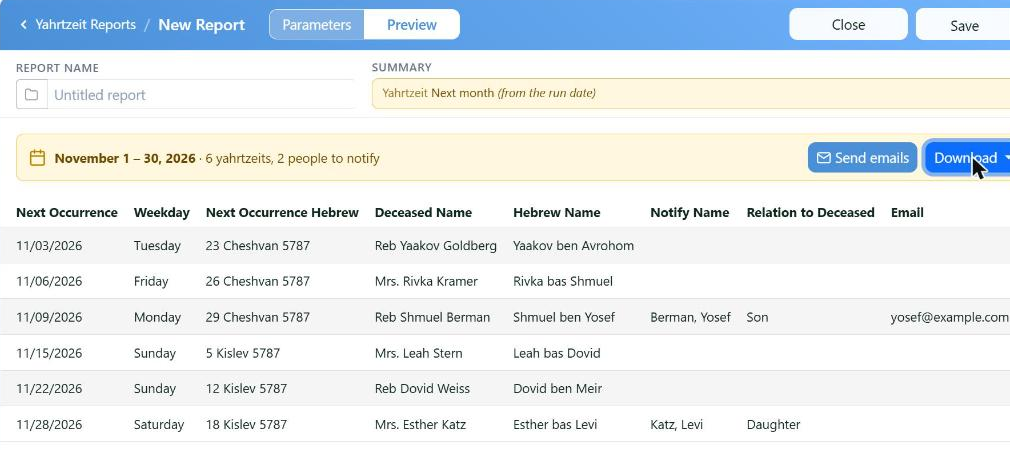
Both calendars side by side, the deceased, and the person to be told. The counts in the banner are your check before anything goes out.
From there:
| Output | What you get |
|---|
| Send emails | The yahrtzeit letter, by email, to everyone the report found |
| Letters | The printed letters, on your stationery |
| Labels / Envelopes | Addressed for mailing |
| Yahrtzeit List | A printable list for the office or the shul |
| Contact Sheet | The people to be told, with their contact details — for a phone call rather than a letter |
| Export CSV | The data, for a spreadsheet |
Many places send the letter and then call the few people who have no email. Has someone to notify plus Limit to people with an email address gives you the first list; clearing the email limit and taking the contact sheet gives you the second.
And the Automatic Ones
CMS can also send yahrtzeit reminders on its own, a set number of days ahead, without anybody running a report — see Automatic Birthdays and Yahrtzeit Emails.
The two work together rather than against each other: the automatic emails handle the routine, and the report is how you check what is coming, print for the people who want paper, and find the records that nobody is attached to.