Recording a yahrtzeit does two things: it keeps the Hebrew date of passing on the record of the person who died, so CMS Cloud knows when the yahrtzeit next falls; and it lets CMS remind the family every year without anyone having to remember.
Worth understanding first: the yahrtzeit belongs to the deceased person's own member record, not to the relative who gets the reminder.
Open the Right Record
Find the person who passed away and open their member page — the page for the individual, not the family. If they aren't in your database at all, add them to the family first.
Mark Them as Deceased
On the General tab, click the pencil to edit the member, scroll to the bottom and check Deceased.
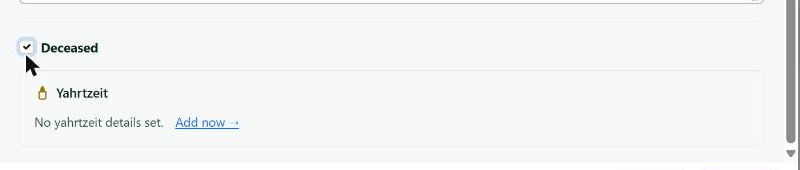
Checking Deceased opens the yahrtzeit panel underneath.
A Yahrtzeit panel appears below it. Add now opens the details.
The Date of Passing
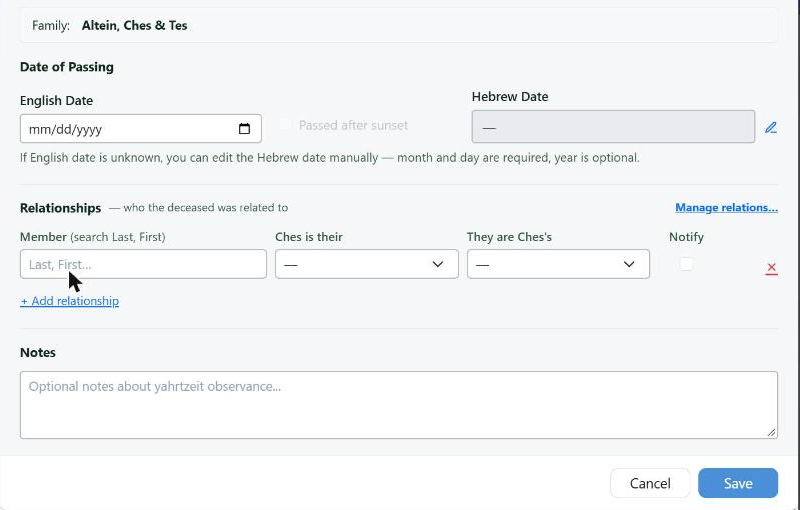
Enter the English date and the Hebrew date is worked out. The Notify box on each relationship is what triggers the yearly reminder.
| Field | What to enter |
|---|
| English Date | The civil date of passing. Enter this if you know it and the Hebrew date is worked out for you |
| Passed after sunset | Check it if the passing was after nightfall, so the Hebrew date moves to the following day |
| Hebrew Date | Calculated from the English date. If the English date is unknown, the pencil beside it lets you enter the Hebrew date by hand — month and day are required, the year is optional |
Enter the English date whenever you have it. It is one entry instead of two, it can't be mistyped into the wrong Hebrew month, and the after-sunset box handles the part people get wrong.
Who Gets Told
Underneath, Relationships is where you say who the deceased was related to — and which of those relatives should be reminded.
+ Add relationship gives you a row with four parts:
- Member — search the relative by last name, first name.
- <Name> is their — what the deceased was to that relative: Father, Mother.
- They are <Name>'s — the other direction: Son, Daughter.
- Notify — check it and this relative gets the yearly reminder.
Add a row for each relative. A yahrtzeit can notify as many people as it needs to, and the ones you don't check are still recorded as related — they simply don't get an email.
No checked Notify means no reminder, however carefully the date was entered. If somebody says they stopped getting a yahrtzeit email, this box is the first place to look.
Notes at the bottom is for anything about the observance itself. Then Save.
Afterwards
The Yahrtzeits tab on a member's page shows the yahrtzeits that member is related to — so when you open a relative, you see whose yahrtzeit they are being reminded about, which is usually the question being asked.
From there, two things use what you entered:
- The dashboard and the CMS Today email show yahrtzeits coming up.
- Automatic yahrtzeit emails send the reminder on their own, as many days ahead as you choose — see Automatic Birthdays and Yahrtzeit Emails.
Yahrtzeit reports produce the lists and letters for a period you choose, in Hebrew date order.