Four things CMS can do without being asked: charge the cards that are due, wish members a happy birthday, remind relatives before a yahrtzeit, and send your staff a daily summary.
Settings → Automation.
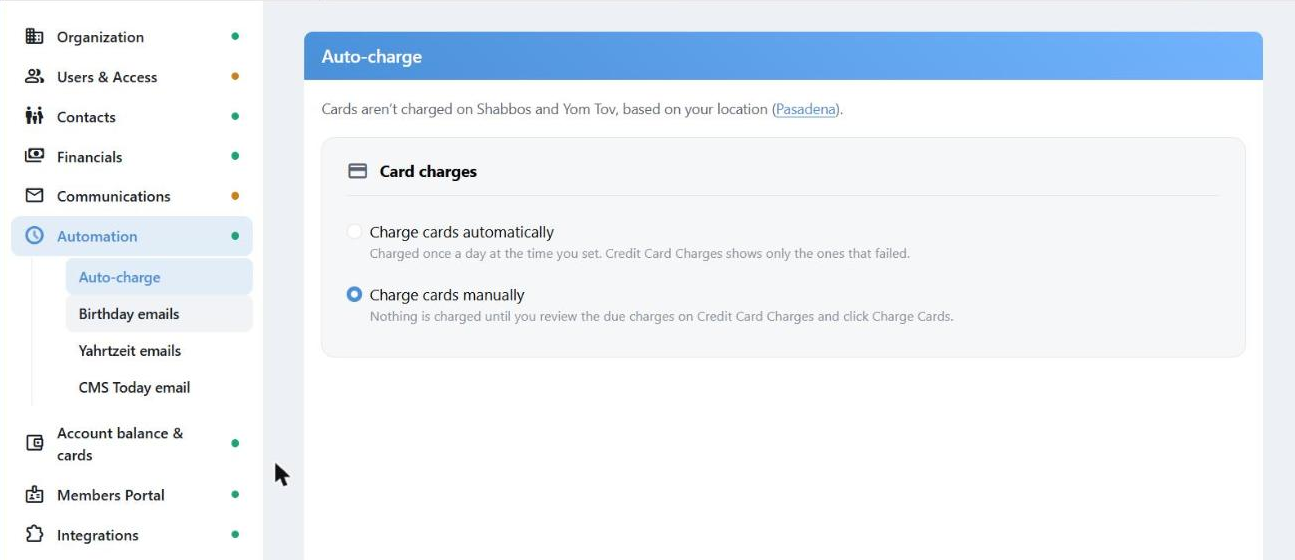
Auto-charge. Everything on this page is scheduled around your location's Shabbos and Yom Tov.
Automation needs your organization's location, because that is how CMS knows when Shabbos and Yom Tov begin. Until it is set under Settings → Organization, nothing here can be changed.
Auto-charge
Two choices, and the difference matters:
| Charge cards automatically | Charge cards manually |
|---|
| Every charge that is due is taken once a day, at the time you set. | Nothing is charged until a person does it. |
| Credit Card Charges then lists only what failed, for you to sort out. | You review what is due on Credit Card Charges and click Charge Cards. |
Cards are never charged on Shabbos or Yom Tov.
Birthday and Yahrtzeit Emails
Both work the same way:
- Days before — anywhere from 0 to 60. A yahrtzeit reminder is usually worth a few days' notice; a birthday greeting goes out on the day.
- Time to send — any time of day, in your time zone.
- Category — everybody, or only members in one member category.
When the date lands on Shabbos or Yom Tov the email goes out the day before rather than late.
Each of these needs a default letter of that type. If there isn't one, the page says so and links you to Communications › Letters. The automatic emails use the default letter only.
The CMS Today Email
A daily digest for your staff: charges, people, follow-ups, account. Not sent on Shabbos or Yom Tov.
Administrators choose who gets it — every user is listed with a checkbox. Everyone else sees only Send it to me.
What I get is personal. Turning a section off removes it from your copy, not anyone else's. On a wide screen, My email today shows a live preview of your own digest as it would look right now, including choices you haven't saved yet. Nothing is sent by looking.
If an administrator leaves nobody selected, CMS turns the whole thing off and says so: "No one is selected, so the CMS Today email is turned off."
Saving
Each area saves on its own. Change something and a bar appears at the bottom — "You have unsaved changes" — with Cancel and Save changes. Moving to another area without saving leaves that area as it was.
When you first turn an option on, its time starts at 9:00 AM.