Everything CMS says on your behalf is written here: the thank-you a donor gets, the invoice, the year-end letter, the birthday and yahrtzeit emails, the printed layout they sit on, and the email addresses they are sent from.
Settings → Communications. It opens on Letters.
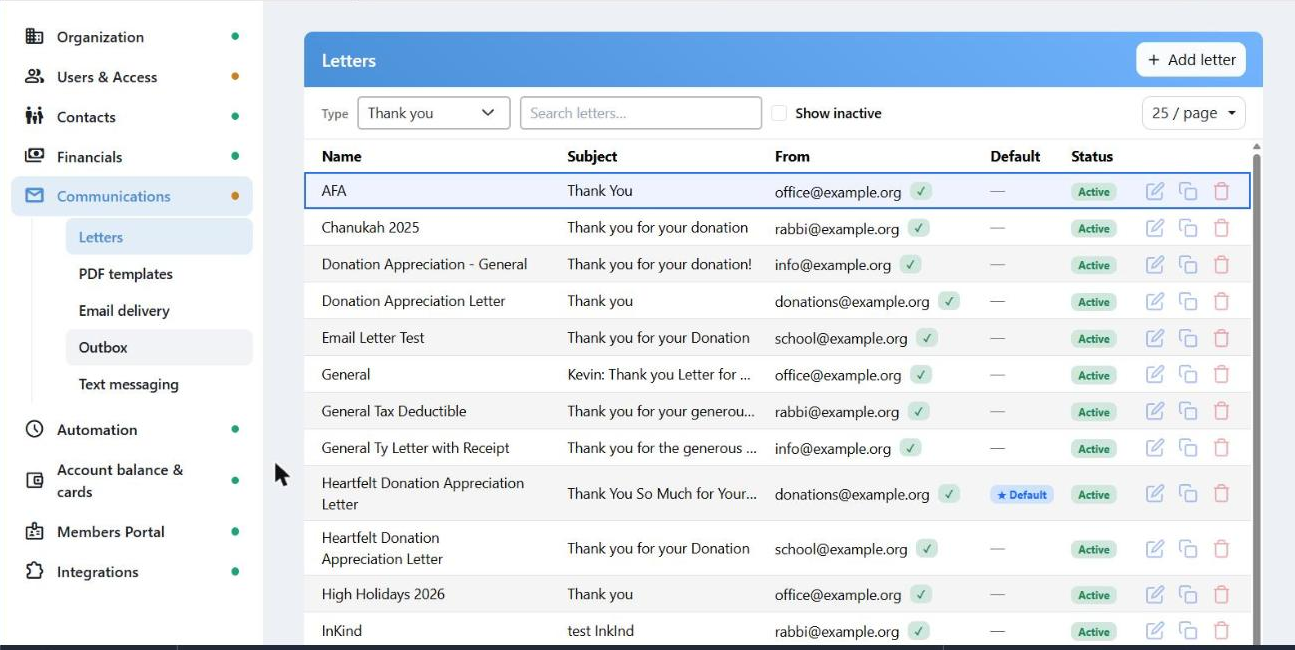
One letter type at a time. The star marks the one used when nothing else is specified.
Letters
A letter belongs to a type, and the type decides where CMS reaches for it:
| Type | Used for |
|---|
| Thank you | Receipts for payments. |
| Pledge | Invoices for bills — the letter type is called Pledge, and it is what prints on a bill. |
| Year End | The annual summary. |
| Notify | Telling a family that a gift was given in their honor or memory. |
| Birthday, Anniversary, Yahrtzeit | The automatic greetings. |
| Renew Pledge, Card Declined, Card Expired | The credit card reminders. |
Use the Type dropdown at the top to switch. You can have as many letters of a type as you like; one is the Default, which is what CMS uses when nothing on the transaction says otherwise.
Marking a letter Default also turns Active on and locks it — the default can't be inactive. Letters marked System can be edited but not deleted.
Writing one
Every letter has a Subject, a From name and a from address built from a mailbox ("office") plus a verified Domain. Then two tabs:
- Email body — the formatted email, with links, images and ready-made templates.
- PDF text — plain text for the printed letter. Line breaks are kept.
Insert field drops a merge field in at the cursor — the family's name, the amount, the address block, the list of transactions. The ? button lists every field available for that type with an example of what it prints.
Preview fills the letter with sample data so you can read it as the donor will. Make a copy is the quickest way to a variation — a Chanukah version of your standard thank-you.
You need a verified sending domain before you can create any letter. Without one, Add letter stops and points you at Email delivery.
PDF Templates
The page the printed letter sits on: letterhead, margins, fonts, the signature. The type picker is shared with Letters, so switching type on one switches it on the other.
Email Delivery
Your sending domains. A domain has to be verified before mail from it is trusted — otherwise letters from that address show "Domain not verified — may not be delivered" and are likely to land in spam.
This is also where an organization that runs its own SendGrid account enters its key, and where you can set a BCC address to keep a copy of everything CMS sends.
Outbox
How mail leaves CMS: whether it goes immediately, or waits in the outbox for a delay or a hold so somebody can look before it goes out.
Text Messaging
Your SMS campaign status and account balance, with View Details opening the full setup wizard without leaving the page. The day-to-day Send SMS and SMS History screens are elsewhere — under Messaging in the main sidebar.