Sending one thank-you from a payment row is fine for one gift. When you need two hundred of them — or a year-end summary for every family that gave — you build a batch. CMS selects the payments, produces the letters, and keeps the whole set so you can print labels and envelopes for it later, or mark it sent.
In the sidebar, Batches → Batch Letters.
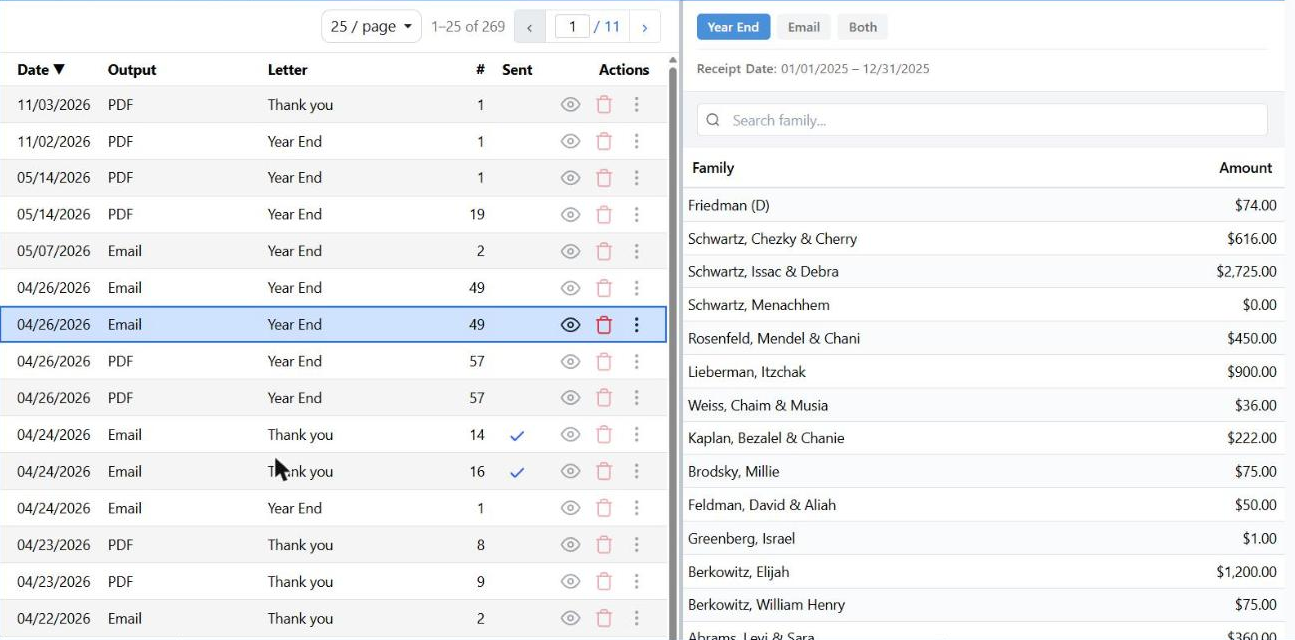
Past batches on the left; click one and its families and amounts fill the panel on the right.
Two Kinds of Batch
| Thank You | Year End |
|---|
| One letter per payment. | One letter per family and address, summarizing a date range. |
| Starts with "Only payments not yet sent" checked, so you don't thank anyone twice. | Starts with the whole year filled in — this year from October onwards, last year before that. |
Batches only ever contain payments. Bills and invoices are not part of this; those go out from Invoices & Statements.
Building a Batch
New Batch, then work down the General tab:
- Letter Type — Thank You or Year End. Switching resets the filters underneath, so choose this first.
- Output Type — Email, PDF for printing, or Export for a data file.
- Delivery (email only) — the letter as HTML Only, as a PDF Attachment, or Both.
- Email Criteria (PDF and Export only) — everyone, only families with an email, or only families without one. That last option is how you print exactly the letters that can't be emailed.
- Mailing Address — limit to families whose address is complete (street, city, state and ZIP all filled), or deliberately pick the incomplete ones to chase.
- Choose the letter. For Thank You it is optional: check Use a specific letter template to override whatever each payment has. For Year End it is required.
Narrowing it down
Show Filters opens the basics — payments not yet sent, payments marked as receipts, and a date range. Additional Filters goes further: categories and subcategories, solicitors, departments, named families, and an amount range.
For a Thank You batch the amount range looks at each payment. For Year End it looks at the family's total for the period, so "everyone who gave $1,000 or more this year" is one filter, not a report.
Preview shows exactly which payments were caught before you commit.
What You Can Do With a Finished Batch
The ⋮ menu on a batch row:
- Create Labels — mailing labels for everyone in the batch.
- Create Envelopes — asks which return address to print.
- Create Letters — PDF batches only; the letters themselves.
- Mark Sent / Mark Unsent.
Each one generates in the background: the button becomes "generating…", then Download once it is ready.
Because the batch is saved with its payments, you can come back weeks later and print envelopes for exactly the same set — no need to rebuild the criteria.
The Unsent Reminder
If you start a new batch while an earlier one is still unmarked, CMS asks whether you meant to: "There are unsent batches. Do you want to continue creating a new batch?" It is a nudge, not a block.
The Don't prompt me about unsent batches checkbox in that message turns the reminder off for the whole organization, not just for you.