If you send your weekly email through ChabadOne Communicator, this integration pushes names and addresses from CMS Cloud straight into a Communicator list — so the people who filled in your form, or were entered by the office this week, are on the list without anyone retyping them.
CMS supplies the people. Communicator sends the email.
Connecting Your Account
In Communicator, open Settings → API Keys. Use the key you already have, or create one — selecting Chabad Management System as what it is for.
Go to Settings → Integrations → Communicator and paste the key into API key.
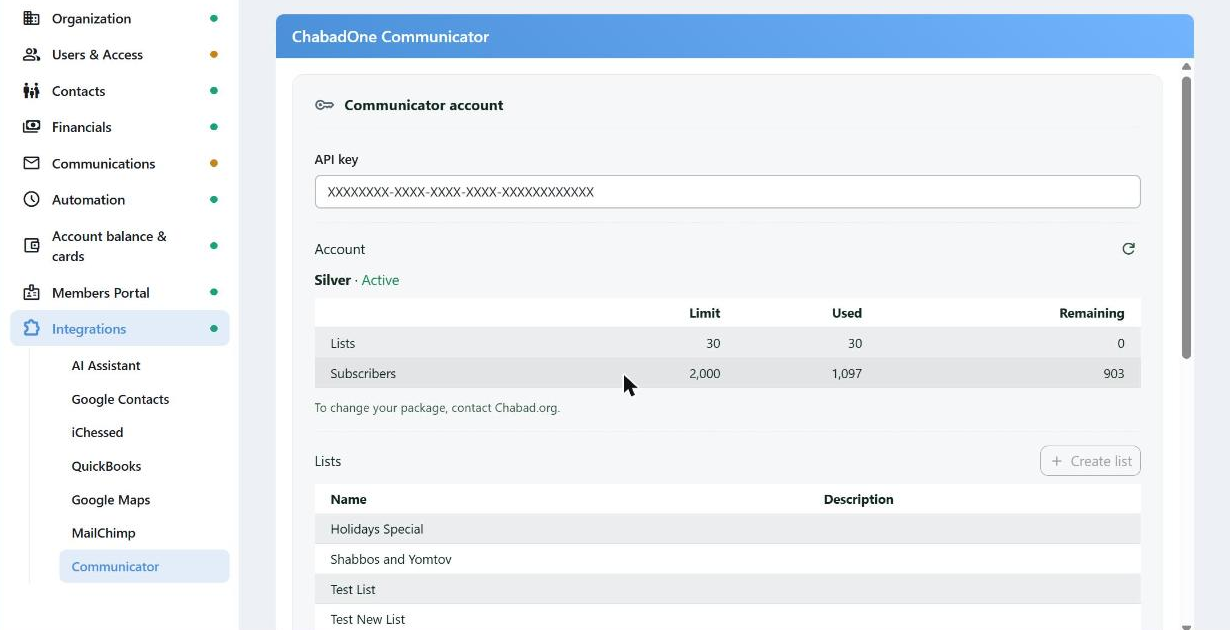
Once the key is in, the page shows your package and how much of it you have used.
Your package appears underneath — the plan, whether it is active, and the limits on lists and subscribers, each with what you have used and what is left. To change the package, speak to Chabad.org; CMS only reports what Communicator tells it.
+ Create list makes a list that CMS can write to.
It has to be created from CMS. The lists you already keep in Communicator can't be used — CMS writes only to the ones it created, which Communicator keeps as system lists.
The refresh button beside the account re-reads your limits and lists from Communicator.
Pushing People to a List
Who goes to Communicator is decided by a member contact report. That is the only way in — build the report that finds the people you want, and it becomes the mailing list.
- Build or open a member contact report.
- Use its mass email action. That opens the Mass email page with the report already chosen.
- Choose the Communicator list to upload into.
- Decide whether to clear the list first, and check the criteria defaults — whether to include non-primary family members, non-primary email addresses, and addresses marked No Send.
- Upload.
The Recipients tab shows exactly who will be uploaded before you start, and History keeps what went up and when. The upload runs on the server, so you can carry on working or close the page; a status bar follows it and can cancel it.
The addresses land in Communicator, where you write and send the email as usual.
Clear list first decides what the list holds afterwards. Leave it off and the people you upload are added to whoever is already on the list. Check it and the list ends up being exactly what CMS just sent.
When It Helps
- Form submissions. People who signed up on your website are in CMS and not in Communicator.
- Office entries. Families added by hand during the week.
- A category you maintain in CMS — the Shabbos list, the parents of the Hebrew School — kept in step with the mailing list without a second place to maintain.